Dragon Medical One | Clinician-controlled Medical Speech Recognition

 
Dragon Medical One medical speech recognition for Australia, New Zealand and Singapore
Medical speech recognition for Australia, New Zealand and APAC

Less typing. More care.

Dragon Medical One is cloud-based medical speech recognition for doctors, specialists and healthcare teams who want to dictate clinical notes, letters, referrals and reports directly into their documentation.

Real-time, medical and flexible: use Dragon Medical One on Windows, connect it to dictation workflow systems, or support Mac users with Voicepoint Helium hosted in Australia for VoiceX clients.

VoiceX
Supporting Dragon since 2003

Sole practitioners to hospital deployments. VoiceX has supported Dragon Medical speech recognition users for more than 20 years.

Microsoft
Now part of Microsoft

Dragon Medical One is now part of Microsoft’s clinical documentation technology portfolio following the Nuance acquisition.

Australia and APAC support
Australian-hosted and supported

VoiceX supports Dragon Medical One customers across Australia, New Zealand, Singapore and the wider APAC region.

The Gold Standard in Medical Speech Recognition

Dragon Medical One.

Medical dictation that fits the way doctors work

Dragon Medical One is a cloud-based, verbatim-style medical speech recognition solution that converts a clinician’s spoken words into text in real time.

Doctors use Dragon Medical One to dictate into clinical systems, documents, templates, browser fields, emails and the Dragon Dictation Box. It is designed for healthcare language and gives clinicians direct control over the words being created.

Unlike general speech-to-text tools, Dragon Medical One is built around an author-specific profile and features a powerful medical vocabulary that covers medical specialties. Doctors can create custom words, phrases, AutoTexts, voice commands and advanced step-by-step commands that reduce repetitive typing. For a broader comparison of healthcare options, visit our Medical Speech Recognition Solutions page.

Australian doctor using Dragon Medical One to dictate patient notes
Real-time dictation

Dictate directly into the applications you already use — from clinical systems and templates to letters, emails and everyday documents.

Medical vocabulary

Dragon Medical One understands speech as clinical documentation, with medical terminology, context, formatting and clinician-specific learning built in.

Author-specific profile

Each clinician has their own Dragon profile and custom vocabulary, allowing Dragon Medical One to adapt to their voice, terminology and dictation style over time.

Workflow-ready

Dragon Medical One features can be extended through SpeechLive or SpeechExec to support deferred speech recognition, giving clinicians the flexibility to dictate now and have documentation processed later.

Watch the demo

See Dragon Medical One in action

Watch how Dragon Medical One helps clinicians dictate clinical notes, letters, referrals and reports in real time, while keeping control over the wording, structure and final document.

This short demo is ideal if you want to understand how medical speech recognition differs from AI Scribe tools, general speech-to-text and traditional typing.

Create clinical documents your way

Dictate every word - your way

Dragon Medical One is ideal when clinicians want to create the document in their own words, rather than relying on software to interpret a conversation and generate a summary.

Dictate findings, assessment, plan, referral wording or report content exactly the way you want it written, with the text appearing in real time so you can review, edit and finalise it before it becomes part of the patient record.

Speak medical dictation icon

Speak

Dictate the clinical detail in your own words using a supported microphone, headset, handheld dictation microphone or PowerMic Mobile.

Medical speech recognition icon

Recognise

Dragon Medical One converts your speech into medical text in real time, using clinical vocabulary designed for healthcare documentation.

Refine dictated medical text icon

Refine

Review the wording as it appears, add detail, make corrections and structure the note, letter or report the way you want it written.

Review and finalise documentation icon

Finalise

Complete the document with confidence before it is saved, sent or added to the patient record.

More than just speech-to-text

Dictate, navigate and automate

Dragon Medical One lets clinicians dictate directly into compatible clinical software, patient records, referral letters, browser fields, emails, templates and the Dragon Dictation Box.

It also helps reduce repetitive typing with AutoTexts for commonly used clinical phrases, paragraphs and templates, plus Step-by-Step Commands that can insert text, move through fields, open applications or complete routine documentation steps using voice commands.

This gives clinicians a faster way to create accurate clinical notes, letters and reports while staying focused on the patient, not the keyboard.

Clinical documentation software and medical dictation environment
Dictate where you work

Speak directly into compatible clinical systems, patient records, browser fields, letters, emails and templates.

Reuse common clinical text

Use custom AutoTexts to insert frequently used phrases, paragraphs, instructions, reports and referral wording by voice.

Automate routine steps

Create custom step-by-step commands to insert text, move through fields, open applications or complete repetitive documentation tasks by voice.

Features clinicians rely on

Advanced tools for quality clinical documentation

Dragon Medical One gives clinicians more than fast speech-to-text. It combines medical vocabulary, personalised voice profiles, reusable AutoTexts, voice commands and workflow-ready options to help create clinical notes, letters and reports faster, with greater control over the final document.

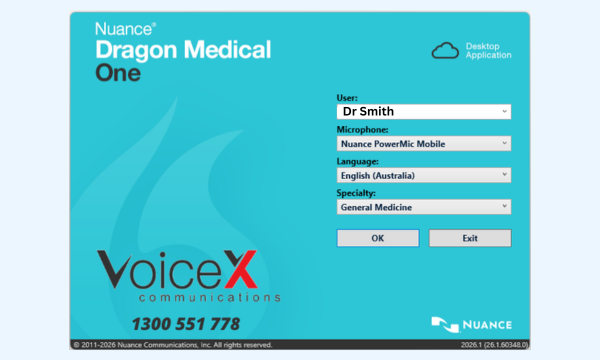
Dragon Medical One cloud with fast set up and no training

Fast setup with cloud access

Dragon Medical One uses a lightweight desktop application that connects to each clinician’s secure cloud-based Dragon profile. It can be installed on multiple compatible computers, so clinicians can access their own vocabulary, AutoTexts, commands and preferences wherever they work.

No traditional voice profile training required and a lightweight desktop client for fast user setup.
Dragon Medical Author Profile

Personal author profile

Each clinician uses their own Dragon Medical One profile, including their vocabulary, correction habits, AutoTexts, custom words and commands.

Dragon Medical helps maintain a consistent dictation experience across compatible computers and clinical environments.

Designed around the individual clinician’s voice, vocabulary and documentation style.
Medical vocabulary speech recognition

Medical vocabulary

Dragon Medical One understands speech as clinical documentation, with medical terminology, medications, procedures, specialist phrases and clinical context built in.

Dragon can improve recognition as users correct, personalise and build their vocabulary over time.

Built for clinical language, not general-purpose dictation.
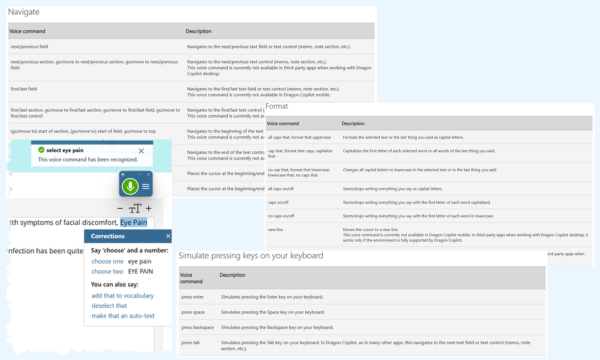
Dragon Medical One Voice Commands

Built-in voice commands

Clinicians can use spoken commands to format, correct and navigate text while documenting, reducing the need to constantly switch between the keyboard and mouse.

Dragon Medical includes a long list of pre-built voice commands
Manage formation for medical dictation

Manage Formatting

Set your preferred format for dates, times, numbers, measurements, numbered lists, and more. Saving you time and letting you define your writing style.

Eliminate the need to use a keyboard or mouse to change formatting
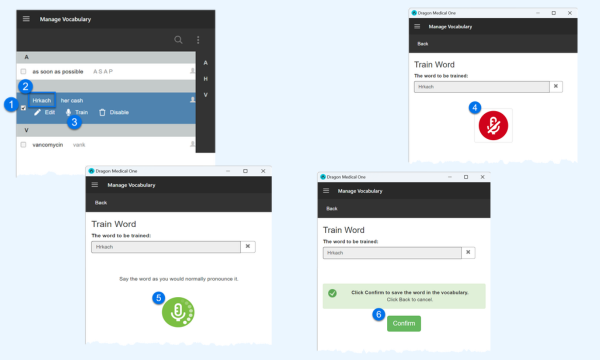
Dragon Medical Add custom words

Custom words and phrases

Clinicians can add custom words, names, abbreviations and preferred phrases to improve recognition of the terms that matter in their speciality or practice.

Add written and phonetic forms so Dragon knows what you say versus what to type.
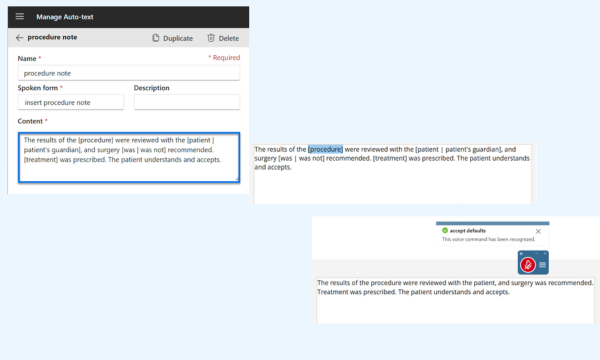
Dragon Medical One Auto text commands

AutoText templates

Clinicians can insert reusable blocks of text with a short spoken command. Variable fields help create longer reports or clinical templates quickly, with unique details completed as needed.

Complete a detailed report in just a few words.
Dragon Medical One Dictation Box

Dictation Box and anchor dictation

Dictation Box is a simple place to dictate and review when direct dictation is not the best option. Anchor dictation helps keep speech recognition focused on a selected target as you move through other screens.

Use voice control even when direct dictation into an application is not ideal.
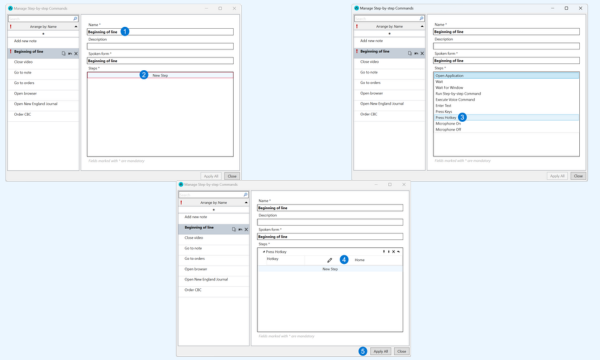
Create Step by Step voice commands

Custom Step-by-Step Commands

Step-by-Step Commands let clinicians turn repeated clicks, keystrokes and common actions into a single spoken instruction.

A command can open a screen, insert text or trigger shortcuts.

Open a specific template or application without touching the keyboard.
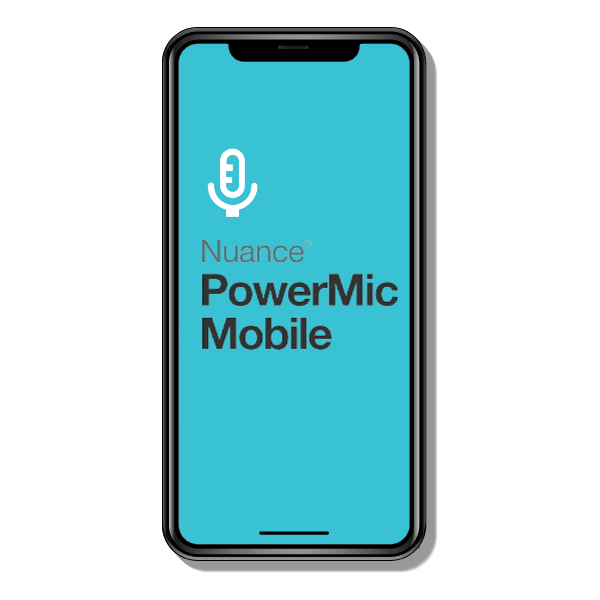
PowerMic Mobile

Turn your smartphone into a Dragon Medical One microphone

PowerMic Mobile allows clinicians to use a compatible iOS or Android smartphone as a wireless microphone for Dragon Medical One.

It is ideal for doctors who move between rooms, work across shared consulting spaces, use hot desks or want a mobile microphone option without carrying a separate handheld dictation device.

PowerMic Mobile supports mobile microphone control and programmable on-screen buttons, making it a practical companion for Dragon Medical One in busy clinical environments.

PowerMic Mobile smartphone microphone for Dragon Medical One
Security and hosting

Security, privacy and Australian hosting for healthcare teams

Dragon Medical One is a cloud-based medical speech recognition service operated by Microsoft/Nuance. For Australian users, Dragon Medical One is hosted within Microsoft Azure infrastructure in Australia.

For VoiceX clients, Voicepoint Helium is also hosted in Australia, providing eligible Mac users with a local hosting option when accessing their Dragon Medical One speech profile through Helium.

VoiceX supports healthcare organisations with licensing, setup, configuration guidance, microphone selection, training options and first-line support for Dragon Medical One and Helium users.

Microsoft Azure Australia

Dragon Medical One for Australian healthcare users is hosted within Microsoft Azure infrastructure in Australia.

Helium is hosted in Australia

For VoiceX clients, Voicepoint Helium is hosted in Australia for Mac access to Dragon Medical One profiles.

Healthcare deployment guidance

VoiceX can assist with deployment planning, user access, microphone selection, training and IT review documentation.

Dragon Medical One for Mac

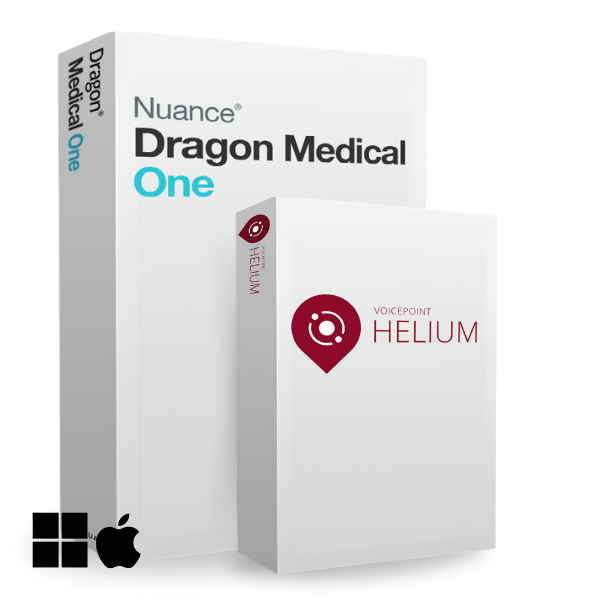
Helium makes Dragon Medical One Mac compatible

On its own, Dragon Medical One is designed for Windows environments. Mac users have traditionally needed to access Dragon Medical One via a Windows remote desktop, terminal server or hosted Windows environment, which can work but often feels complex for clinicians who prefer to work natively on macOS.

Now,  Helium gives Mac users a more practical pathway. Helium is a native macOS speech recognition application that allows clinicians to access their Dragon Medical One speech profile on a Mac, while still supporting use of the profile on Windows through Dragon Medical One.

For VoiceX clients, Helium is hosted in Australia, making it a strong option for Australian healthcare organisations that need Mac access to Dragon Medical One while keeping hosting arrangements aligned with local expectations.

Helium for Dragon Medical One on Mac
Integrate Dragon into your dictation & transcription workflow

Extend Dragon Medical One beyond just real-time speech recognition

Dragon Medical One is powerful as a live, at-cursor medical speech recognition tool. When paired with Philips SpeechLive or Philips SpeechExec Enterprise, it can also support pre-recorded dictations, routing to assistants or typists, background recognition and Human-in-the-Loop review against the original audio.

Standard Dragon Medical One

The clinician dictates directly into a compatible application, document, browser field or Dictation Box, and text appears where the cursor is placed. This suits doctors who want to complete and review their own documentation as they go.

Dragon Medical One with workflow

The doctor can record a dictation first, then send it through a workflow system for speech recognition, admin review, typist correction or document finalisation. This is useful where assistants still manage documentation or where doctors prefer delegated document handling.

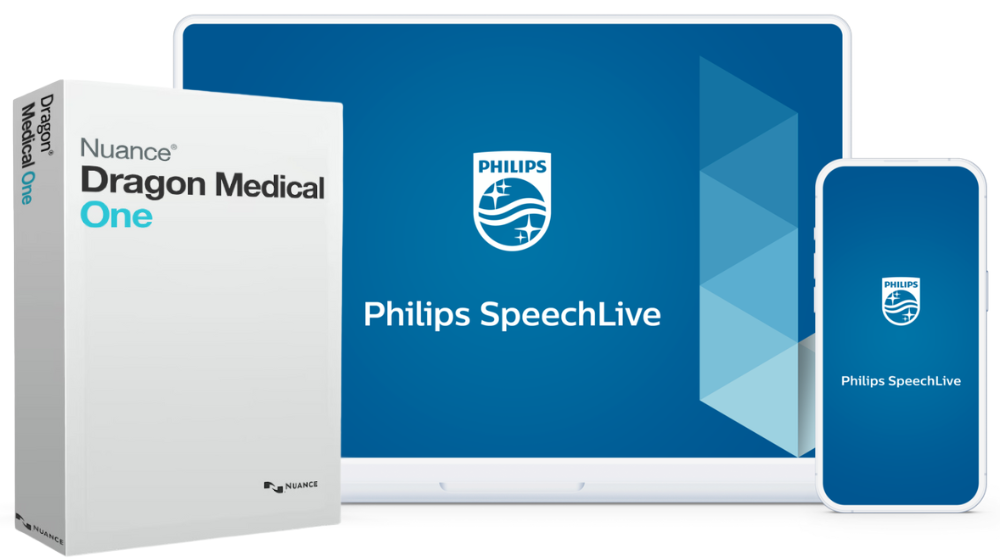
Dragon Medical One with SpeechLive dictation and transcription workflow
Cloud workflow

Dragon Medical One + SpeechLive

Use Dragon Medical One with SpeechLive to support cloud dictation, transcription routing, background recognition and Human-in-the-Loop review.

Learn about DMO + SpeechLive
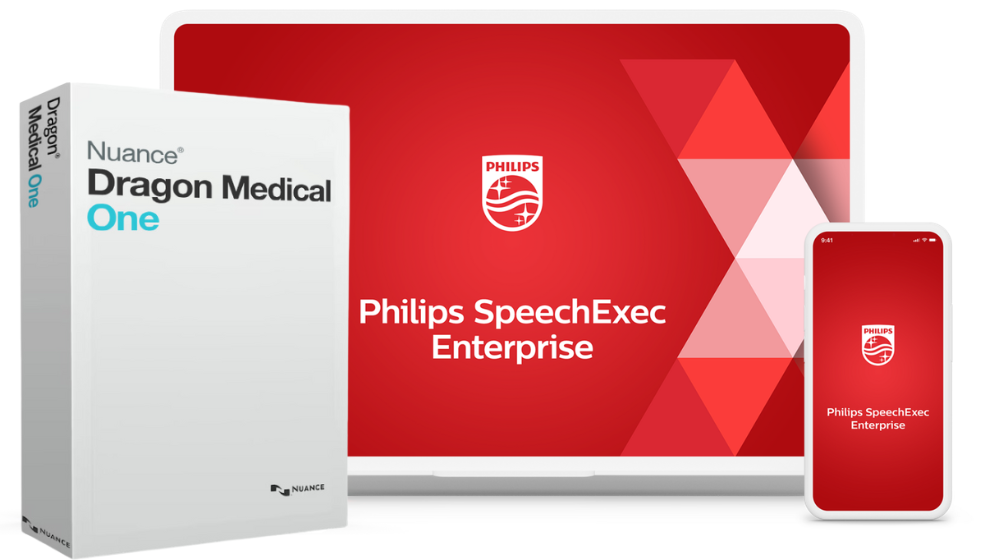
Dragon Medical One with SpeechExec Enterprise on-premises dictation transcription workflow
Enterprise workflow

Dragon Medical One + SpeechExec Enterprise

Use Dragon Medical One with SpeechExec when an on-premises or more controlled enterprise-style dictation and transcription environment is required.

Learn about DMO + SpeechExec
Speech recognition microphones and recorders for Dragon Medical One
Accuracy starts with audio

Why the right microphone matters for Dragon Medical One

Speech recognition accuracy depends on more than the software. Dragon Medical One performs best when the clinician uses a high-quality microphone that captures clear speech and reduces background noise.

In a medical environment, microphone choice can make a real difference. Consulting rooms, treatment areas, shared offices and telehealth spaces all create different audio challenges. A poor microphone may pick up room noise, keyboard sounds, echo or inconsistent speech levels, which can reduce recognition quality.

Dragon Medical One vs Medical AI-Scribes

Medical speech recognition with the clinician in control

For years, Dragon has helped doctors, specialists and healthcare providers create accurate clinical documentation faster, reducing typing and allowing more time for patient care.

New AI scribes are designed to listen to consultations and automatically generate summarised notes.

Dragon Medical One is different.

Dragon supports verbatim-style medical dictation, where the clinician says exactly what they want written and Dragon converts it into text in real time.

That makes Dragon Medical One ideal for clinicians who want to control the wording, structure and detail of their notes, referrals, letters, reports and correspondence — without relying on AI to decide what should be included.

Documentation need Dragon Medical One AI Scribe solution
Primary purpose Real-time medical speech recognition for clinician-controlled dictation. Ambient or recorded consultation capture with AI-generated structured documentation.
How text is created The clinician speaks the words they want documented, and Dragon converts them into text. The AI analyses a consultation or recording and generates a draft note, summary or structured document.
Best suited to Letters, referrals, clinical notes, reports, dictation into fields and verbatim medical speech-to-text. Consultation summaries, SOAP notes, patient visit notes, clinical summaries and structured documentation drafts.
Human review The clinician reviews the text while dictating or before saving. The clinician, admin team or typist reviews the AI-generated draft against the consultation context and, where available, retained audio.
Can they work together? Yes. Dragon Medical One can remain the controlled dictation tool for precise text entry. Yes. AI Scribe can support consultation capture and draft creation where that model is appropriate.
Trial, implementation, training and support

Dragon Medical One product and support pathways

Whether you are a sole practitioner, specialist clinic, or hospital, VoiceX can help you choose the right Dragon Medical One pathway, trial the software, implement it, provide training, and offer ongoing technical support and user management.

Choose

VoiceX consultants help you and your team determine the most suitable Dragon Medical One speech recognition solution.

Trial

Experience how Dragon Medical One can work within your environment with an obligation-free trial and personalised support.

Implement

Setup and implementation are practical and guided. Our technical team helps ensure users are ready to dictate confidently.

Support

VoiceX’s technical team is based in Melbourne, Australia and has supported doctors, specialists, clinics and hospitals since 2003.

Still deciding?

Let VoiceX help you with selecting the right document creation solution

Not every doctor needs the same documentation setup. Some clinicians need to dictate directly. Others want an assistant to manage the document. Some practices want AI-generated consultation notes. VoiceX helps you choose the right path for your environment as a whole

Verbatim Medical speech recognition

Dragon Medical One Speech Recognition

Best for medical professionals who want real-time medical dictation with medical vocabulary, commands, AutoTexts and personal speech recognition.

Medical Speech Recognition on Mac

Helium for Dragon Medical One

Best for Mac users who want a more native macOS pathway to access their Dragon Medical One speech profile without relying only on remote desktop.

AI-Generated Documentation

Medical AI Scribe solutions

Best for clinicians who want consultation audio captured and converted into structured draft notes, summaries or clinical documents for review.

A little bit of everything!!

All-In-One Workflow

If you want the best of all worlds, VoiceX offers all-in-one dictation and speech recognition with AI scribe workflow solutions.  Allow your doctors to work the way they need.

VoiceX Australia and New Zealand leading AI document creation specialists
Why VoiceX

Why choose VoiceX for Dragon Medical One?

VoiceX is Australian-owned and has supported Dragon Medical speech recognition users since 2003. We help clinicians, specialists, practices and healthcare organisations choose, implement and support Dragon Medical One as part of a practical documentation setup.

Our team can assist with licensing, trial setup, microphone selection, user onboarding, AutoText and command training, workflow integration, Helium for Mac access and post-sales support across Australia, New Zealand and eligible APAC markets.

  • Supporting Dragon speech recognition users since 2003
  • Australian-owned specialist provider
  • Dragon Medical One supply, setup, training and support
  • Voicepoint Helium for Mac users hosted in Australia for VoiceX clients
  • Guidance across speech recognition, workflow, transcription and AI Scribe options
  • Local Australian technical support and end-user training
NSW HealthNSW Health PathologyRoyal Melbourne HospitalCrown LawIndustrial Relations CommissionHigh Court of AustraliaHWL EbsworthMinterEllisonHealthscopeSt Vincent's HospitalMonash UniversityWorkSafe Victoria

Frequently asked questions

Is Dragon Medical One an AI Scribe?

No. Dragon Medical One is medical speech recognition software. It converts clinician speech into text in real time. AI Scribe solutions capture consultations and generate structured draft notes from the conversation.

Why is Dragon Medical One often described as the gold standard for medical dictation?

Dragon Medical One is widely used because it combines medical vocabulary, real-time dictation, personal author profiles, custom words, AutoTexts, voice commands and workflow options. It is especially strong for clinicians who want controlled, verbatim-style medical speech recognition.

Does Dragon Medical One work with Best Practice, Genie, MedicalDirector and other clinical systems?

Dragon Medical One is designed for at-cursor dictation into compatible applications, browser fields, documents, emails and the Dragon Dictation Box. Suitability can depend on the clinical software, browser, device environment and deployment method. VoiceX can help confirm the best setup for your practice or organisation.

Is Dragon Medical One better than general dictation tools?

Dragon Medical One is built specifically for healthcare documentation, with medical vocabulary, personal author profiles, AutoTexts, custom words and clinical dictation features. General dictation tools may be useful for simple text entry, but they are not usually designed for medical terminology, clinical documentation or healthcare deployment requirements.

Does Dragon Medical One learn how I speak?

Dragon Medical One uses an individual author experience that can be personalised with vocabulary, correction habits, AutoTexts and commands. VoiceX can help users understand the best way to build a cleaner, more efficient dictation experience over time.

Can I use PowerMic Mobile with Dragon Medical One?

Yes. PowerMic Mobile allows a compatible iOS or Android smartphone to act as a wireless microphone for Dragon Medical One. It is useful for clinicians who move between rooms, share workstations or prefer not to use a dedicated handheld dictation microphone.

Can I use Dragon Medical One on a Mac?

Dragon Medical One is normally used with the Windows-based Dragon Medical One client. Mac users can access Dragon Medical One through remote desktop or terminal server environments, but Voicepoint Helium provides a more native macOS pathway. For VoiceX clients, Helium is hosted in Australia and allows eligible Mac users to access their Dragon Medical One profile from a Mac.

Is Voicepoint Helium the same as Dragon Medical One?

No. Helium is a separate macOS solution that allows Mac users to access their Dragon Medical One speech profile. The standard Dragon Medical One client remains Windows-based, while Helium provides a Mac pathway for eligible users.

Can Dragon Medical One work with SpeechLive?

Yes. SpeechLive supports Dragon Medical One integration so eligible author dictations can be sent to DMO for speech recognition. This allows Dragon Medical One to support background or deferred speech recognition as part of a cloud dictation and transcription workflow.

Can Dragon Medical One work with SpeechExec Enterprise?

Yes. Dragon Medical One can be used as part of a SpeechExec Enterprise dictation and transcription environment where the deployment has been designed and configured for that workflow. This is often relevant for larger teams that need controlled dictation routing, review and transcription processes.

What is the difference between live dictation and background speech recognition?

Live dictation means the clinician speaks and text appears at the cursor immediately. Background speech recognition means a recorded dictation is sent for recognition after it has been recorded, often allowing a typist, admin user or reviewer to check the draft against the original audio.

What microphone should I use with Dragon Medical One?

For best results, use a high-quality dictation microphone or professional headset designed for clear speech capture. VoiceX can recommend Philips SpeechMike devices, professional headsets, PowerMic Mobile options and other suitable microphones based on your environment.

Is Dragon Medical One hosted in Australia?

For Australian users, Dragon Medical One is hosted within Microsoft Azure infrastructure in Australia. VoiceX can assist healthcare organisations with licensing, setup, deployment guidance and support.

Is Helium hosted in Australia?

Yes. For VoiceX clients, Voicepoint Helium is hosted in Australia. This gives eligible Mac users a local hosting pathway when accessing their Dragon Medical One profile through Helium.

Can VoiceX supply Dragon Medical One outside Australia?

Yes. VoiceX can supply and support Dragon Medical One for eligible customers across Australia, New Zealand and the wider APAC region, including Singapore and other supported markets.

Do I need training for Dragon Medical One?

Training is strongly recommended for new users and valuable for experienced users who want to get more from AutoTexts, custom words, correction techniques, microphone setup and voice commands.

Ready to explore Dragon Medical One?

VoiceX can help you trial Dragon Medical One, compare package options, assess Mac access with Helium, review SpeechLive or SpeechExec Enterprise workflow integration, and plan the right medical documentation pathway for your clinicians.