
Call Us: 1300 551 778

Fully featured, specialist legal speech recognition for your working day. Dictate legal documents, emails and matter notes, use desktop voice editing and formatting, or turn recorded audio into text at your desk or on the move.
Included: SpeechLive Legal Direct speech recognition, SpeechLive Pro workflow, desktop app, SpeechLive mobile app and browser access for one authorised author. Australian Microsoft Azure hosting and local VoiceX support.
Request a SpeechLive TrialLearn more about SpeechLive Legal Direct →
Already subscribe to SpeechLive Pro or Enterprise? Contact VoiceX about the add-on. This package includes the workflow licence; SpeechLive Legal AI Assistant is a separate option.
Licence & terms: 12-month subscription. SpeechLive subscription terms · VoiceX purchase terms
SpeechLive Legal Direct
Imagine dictating a letter, editing and formatting it by voice, then capturing your next matter note on your phone. SpeechLive Legal Direct is fully featured, specialist legal speech recognition for solicitors, barristers and legal teams. Create correspondence, advice and legal documents in your own words, with desktop, mobile and browser access connected to your SpeechLive workflow.
This 12-month package includes both SpeechLive Legal Direct and SpeechLive Pro workflow for one author. Your speech recognition and cloud dictation workflow work together, with VoiceX support for customers across Australia and New Zealand.
Request a SpeechLive TrialLearn more about the SpeechLive Legal Direct solution →Dictate your way
Use the SpeechLive Desktop App to control your microphone and dictate at the cursor. Create letters, emails and file notes in supported applications, then navigate, select, edit and format your text by voice.
Create dictations, use speech recognition and manage audio and recognised text in SpeechLive through your browser. Keep your worklist and document creation workflow close at hand, wherever you are working.
Capture instructions and file notes with the included SpeechLive mobile app for iOS and Android. Use mobile speech recognition or record and send dictations into your workflow. Record offline and upload when you reconnect. Explore the SpeechLive mobile app →
Upload recordings from your dictation recorder or other audio sources for background speech recognition. Convert existing dictations, interviews and conversations into text without speaking them again.
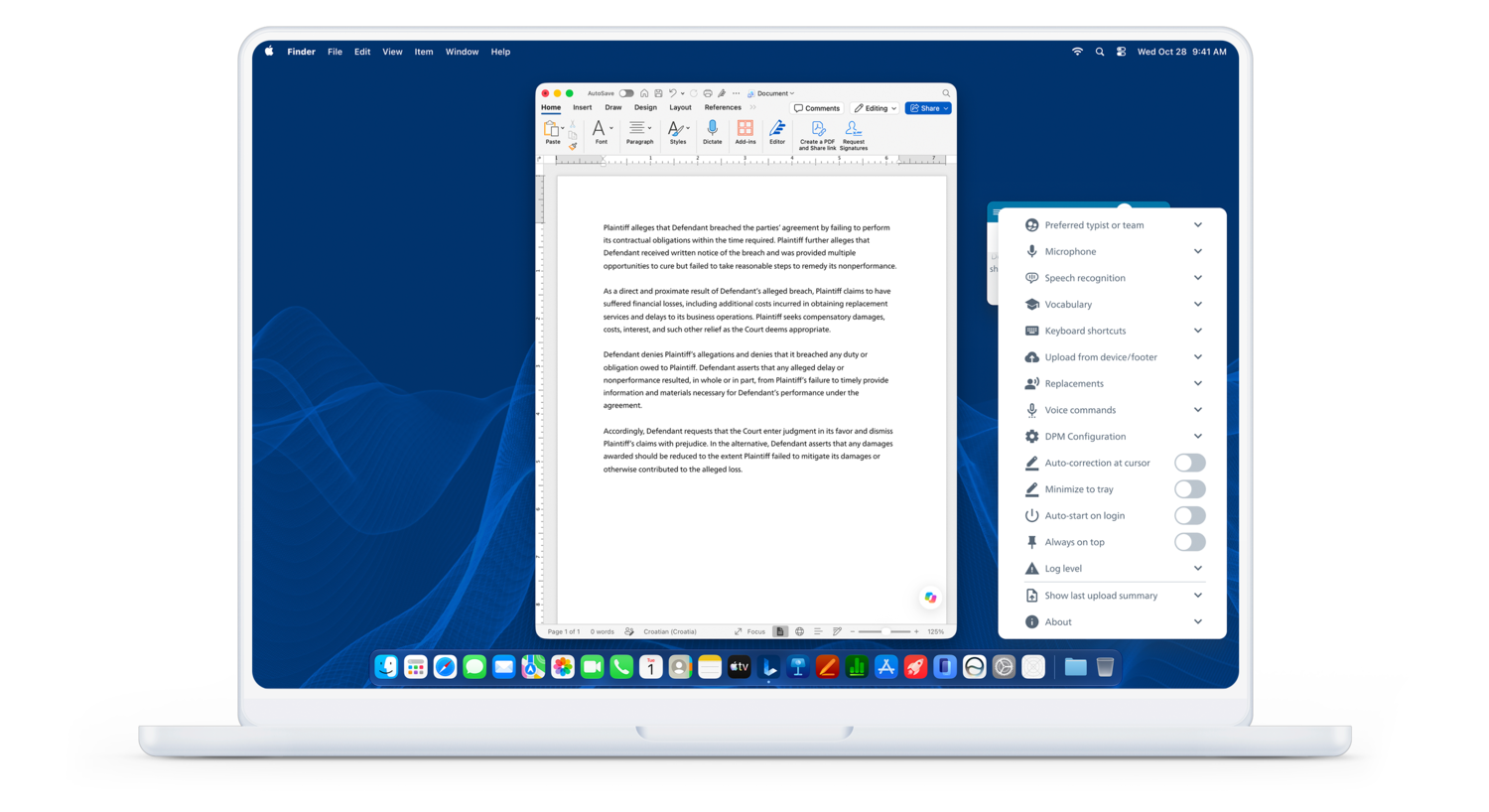
The desktop app keeps speech recognition controls and personalisation tools beside your document.
Built around legal work
Specialist legal speech recognition supports legal terminology. Add names and practice-specific terms to your vocabulary for real-time speech recognition. Use text replacements for preferred wording and frequently used phrases; replacements sync across desktop, web and mobile and apply to both real-time and recorded-audio recognition.
Use desktop direct-to-cursor commands to select, edit and format text in supported applications. For example, say “Select last word”, “Bold that” or “Italicize that”. “Scratch that” deletes selected text; “Undo that” reverses the last action. These editing commands are desktop-only, not web or mobile features. Text replacements provide reusable wording separately.
Use MultiSpeak in the SpeechLive Desktop App to transcribe a live conversation in real time, with speaker labels, timestamps and automatic punctuation. For an existing recording, upload the audio and send it for recognition later. Review speaker attribution and the transcript before relying on the result.
Available through SpeechLive AI where enabled for your licensed speech-recognition account, Smart Transcript adds punctuation and basic corrections. Refine can improve grammar and punctuation, remove filler words and apply a business or legal style while aiming to preserve meaning. Neither produces a guaranteed verbatim record. Check availability with VoiceX and review every result before using it in correspondence or a matter file.
Learn more about SpeechLive Legal Direct features and legal use cases →
Workflow included
The included SpeechLive Pro workflow connects the ways you capture and process dictation. Manage audio and recognised text in the cloud, track work and collaborate with your transcription team where additional user licences are assigned.
The legal speech recognition package: desktop, browser and mobile recognition, recorded-audio conversion, real-time Desktop MultiSpeak and personalisation tools. SpeechLive AI processing options depend on your licensed account.
The cloud dictation and transcription foundation, included in this product. Capture, upload and manage dictations without purchasing a separate Pro workflow licence for this author.
Explore the SpeechLive workflow solution → Compare SpeechLive plans and modules →
Your devices. Your working day.
Configure supported Philips Digital Pocket Memo (DPM) recorders, SpeechMike Premium and SpeechMike Ambient devices through the desktop tools. Set up your recorder and microphone around the way you dictate.
Automatically upload dictations from supported Pocket Memo recorders or monitored folders into your SpeechLive workflow on Windows. Automatic device and folder upload are Windows-only; manual recorder upload is supported on Mac.
Access your workflow through a browser, use the desktop app for dictation at the cursor, and take the mobile app with you. Your named-user subscription supports your work across locations, without a local SpeechLive server to maintain.
Install the desktop app and any device connectors required for your hardware. Browser hardware integration may require both an extension and its companion application.
Windows and Mac are supported. The redesigned desktop app is available for Windows and Apple Silicon Macs; Intel Macs use the legacy app. Available commands, device functions and application integration can vary. VoiceX can check your setup during your trial.
Australian SpeechLive accounts are hosted on Microsoft Azure infrastructure in Australia. Manage dictations and recognised text in a central cloud workflow, with encryption in transit and at rest.
Philips publicly lists the following certifications in the SpeechLive Trust Center:
View the Philips SpeechLive Trust Center and certification documents →
These are the certifications publicly listed by Philips for SpeechLive. Certificate scope and supporting documentation are available through its Trust Center.
Your subscription
Microphones, recorders and additional user licences are purchased separately. Already have SpeechLive Pro or Enterprise? Ask VoiceX about adding SpeechLive Legal Direct to your existing subscription.
Choose your next step
SpeechLive Legal Direct — this product is for creating your own wording by voice and transcribing live conversations or recordings. If you also want to generate structured legal documents from instructions and source material, explore SpeechLive Legal AI Assistant. It includes SpeechLive Legal Direct and adds AI document drafting within SpeechLive Enterprise; it is not included in this Pro package.
For broader business dictation, compare the SpeechLive Professional Direct speech recognition and workflow solution. For workflow without a speech recognition module, see SpeechLive Pro Cloud Dictation & Transcription.
VoiceX helps you get your subscription underway. Visit our SpeechLive support and training hub for guidance on authors, transcription and speech recognition.
Choose a dedicated dictation microphone for your desk or a recorder for work on the move. Shop speech recognition microphones →
Experience dictation at the cursor, mobile recording and recorded-audio recognition with the documents you create. Request a trial, or speak with VoiceX about licensing for your legal team.
Request a SpeechLive TrialTalk to VoiceXLearn more about SpeechLive Legal Direct → Compare SpeechLive plans →
Speech recognition is subject to fair use. Review all recognised text and AI-processed results. SpeechLive subscription terms · VoiceX purchase terms
