Dragon Medical One + SpeechLive combines real-time speech recognition at the cursor with deferred/background transcription from pre-recorded audio (recorder or SpeechLive Mobile App). Draft text returns linked to the original audio for quick QA and export to your EMR. Hosted in Australia. Implemented & supported by VoiceX.
Real-time speech recognition at the cursor plusdeferred/background transcription from pre-recorded audio (recorder or SpeechLive Mobile App). Draft text returns linked to the original audio for fast QA and export to your EMR. Hosted in Australia. Implemented & supported by VoiceX.
Key capability
Real-time dictation
Use Dragon Medical One directly in your EMR with specialty vocabularies and Auto-Texts.
Added with SpeechLive
Background transcription
Submit pre-recorded audio to Dragon for a draft transcript, linked to the original audio.
Who it suits
Clinics with workflows
Doctors dictating on the go, plus typists/admin for QA and document finalisation.
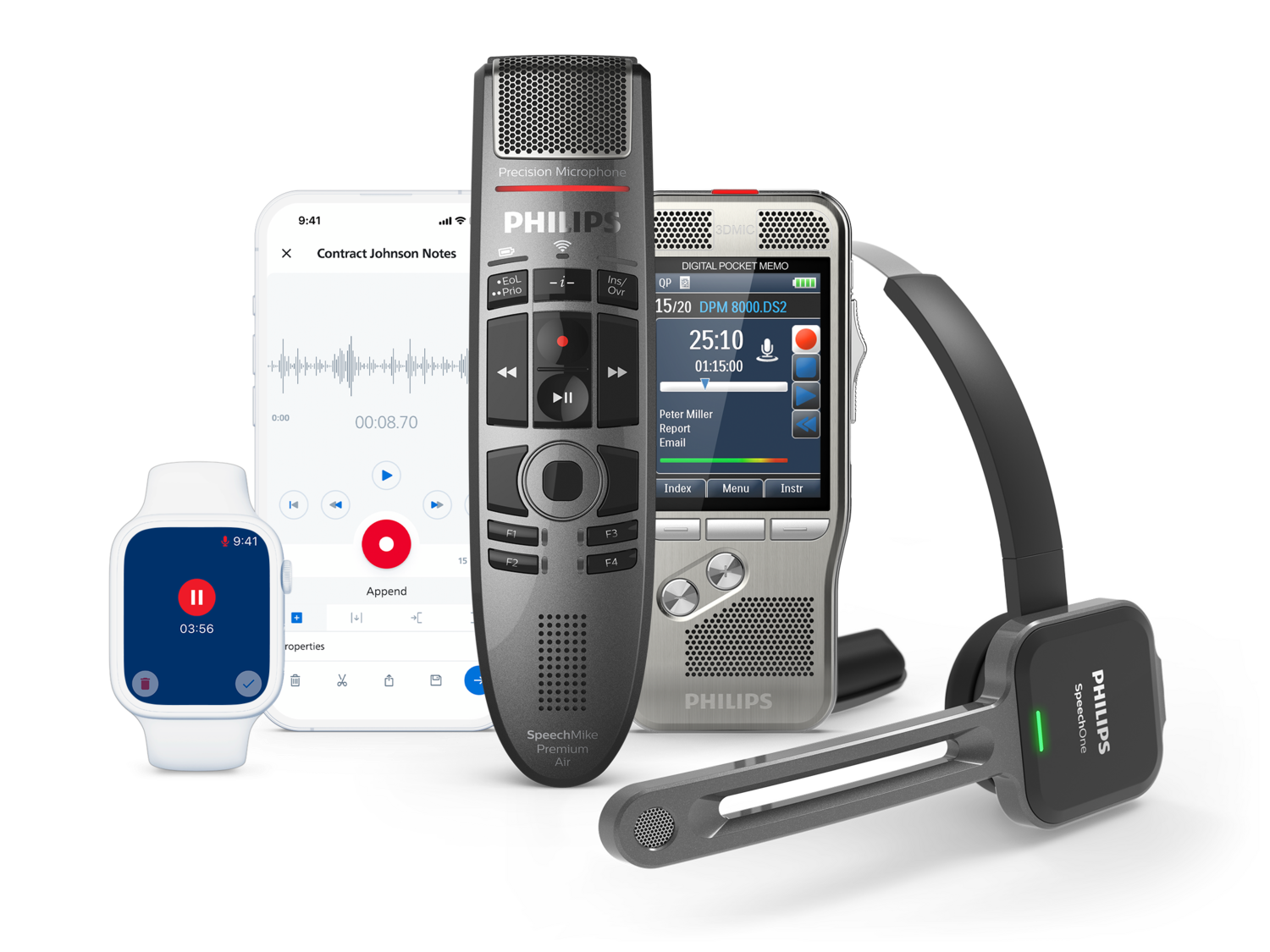
Dictate using a Philips or Olympus/OM System dictation recorder, the SpeechLive Mobile App, or SpeechMike
2. Submit
Upload your pre-recorded dictation audio automatically upon completing to SpeechLive. Then submit to Dragon for background recognition.
3. QA & Export
Proof the transcribed draft text with the aid of the linked original dictation recording. Then simply export to Word/PDF or paste into your EMR.
What’s Included
Dragon Medical One (Author)
Real-time speech recognition; Australian hosting; speciality medical vocabularies; custom vocabulary & Auto-Texts; roaming profile; Windows & Mac support (incl. DMO for Mac access); VoiceX onboarding.
SpeechLive (Author)
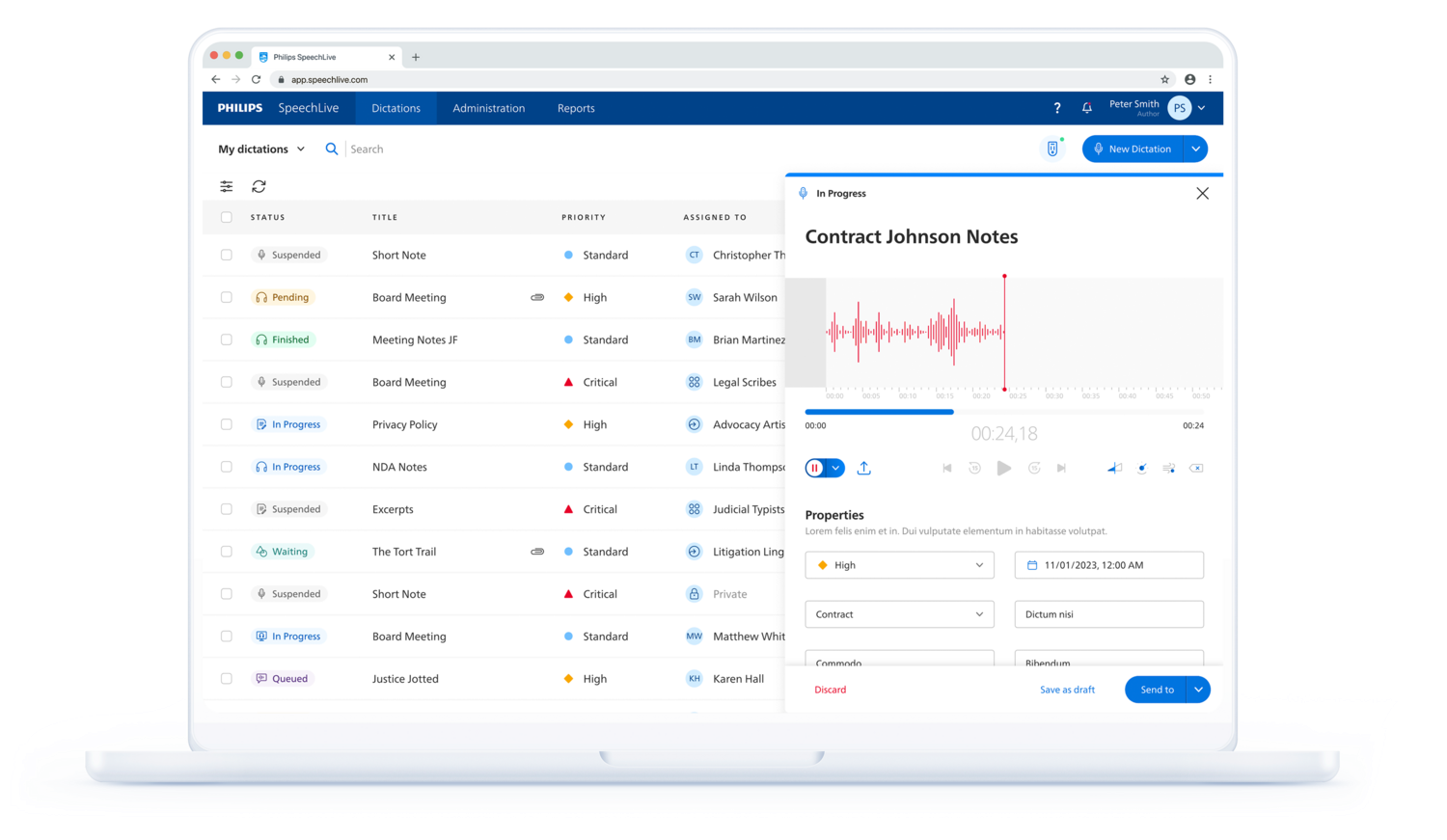
Secure dictation workflow; Mobile App (iOS/Android); Browser Recorder; background transcription submission to Dragon Medical One; transcript linked to original audio; editor with foot control support; export to Word/PDF/txt.
Implementation
Provisioning of Dragon Medical One + SpeechLive author; workflow configuration for background SR; best-practice templates/Auto-Texts; optional typist/admin seats available.
Support
Unlimited technical support for DMO+ customers during the subscription term; training options available; remote assistance by VoiceX.
Note: If you already have SpeechLive Plus/Enterprise and Dragon Medical One, you can enable background SR without extra licences. Contact VoiceX for setup.
Optimised Dictation USB mics for both Dragon real-time dictation and SpeechLive Browser Recorder.
SpeechLive AI Assistant Multi-speech speech recognition with AI-powered smart transcript, actionable insights & more. Ideal for part-time staff
Requirements
Active Dragon Medical One author subscription.
Active SpeechLive author in a SpeechLive account.
Windows PC for DMO desktop usage; Mac supported (including DMO for Mac access).
Modern browser and internet connection for SpeechLive.
Optional: Philips/OM System recorder and/or SpeechMike dictation microphone.
Security & Trust
Both Dragon Medical One and SpeechLive are designed for secure, compliant use in clinical environments, with Australian hosting and enterprise-grade protections. VoiceX provides first-line support and implementation guidance for security-conscious deployments.
Your path to DAX Copilot
DMO is the pathway to Nuance’s advanced ambient documentation capabilities. Learn more on the Nuance site.
Since 2003, VoiceX has delivered medical dictation, transcription, and Speech Recognition solutions nationwide.
Workflow expertise
We align Dragon Medical One + SpeechLive with your EMR, templates, and team processes for measurable time savings.
Unlimited support (DMO+)
Active Dragon Medical One + subscriptions include unlimited VoiceX technical support.
Frequently Asked Questions
Can a typist submit dictations to Dragon on behalf of a doctor? Yes. With SpeechLive workflow, typists/admin can submit eligible recordings for background SR; the draft returns linked to the original audio for proofing.
Does background SR use the doctor’s own DMO profile? Yes — it leverages the author’s DMO profile for accuracy consistent with their real-time dictation.
Can we still audio-type if we prefer? Yes. You can mix traditional audio-typing and background SR per dictation or per user.
Is this hosted in Australia? Yes — DMO and SpeechLive are provisioned for Australian hosting.
What if we already have DMO and SpeechLive? If you have SpeechLive Plus/Enterprise and DMO, background SR can be enabled with configuration only. Contact VoiceX.
Ready to get started?
Trial DMO, trial SpeechLive, or speak with our team about pricing and deployment options.
Dragon Medical One: An active, appropriately provisioned author subscription and supported DMO client are required.
SpeechLive plan: Philips' current integration documentation lists SpeechLive Pro and Enterprise. Confirm eligibility for any existing or legacy plan before setup.
Author configuration: The SpeechLive administrator enables the integration and configures the DMO username for each participating author. Philips documents DMO integration activation for authors.
Reviewers: Each SpeechLive author and transcriptionist needs a separate named-user licence. Optional typist/admin access is configured for the team's review workflow.
Confirm the exact author, assistant and Mac-access components in your VoiceX offer, including any submission-on-behalf workflow and required permissions.
Windows workstation for DMO background processing
The documented SpeechLive-to-DMO processing route uses a configured Windows DMO application with the latest Philips Device Connector and its DMO Management components. Start Dragon Medical One at least once before using the integration, and check the client release against Philips' supported list.
VoiceX-supported Windows setup: Windows 11 with current patches. VoiceX does not support Windows 10.
Current DMO runtimes: .NET 10.x x86, .NET Framework 4.8 or later and Microsoft Edge WebView2 for personalisation and help.
Resources: VoiceX recommends a 2.8 GHz processor and 4 GB RAM or more, allowing additional capacity for Windows, the browser and clinical applications.
Connectivity: Reliable internet access to the correct regional DMO and SpeechLive services, with current authentication, network and device-extension requirements.
Submission: Eligible dictations are sent from the Transcription pending state. Confirm the configured author and processing workstation.
Mac browser access or a separate Mac dictation client does not replace this documented Windows DMO-processing setup.
SpeechLive browser: Use current Google Chrome or Microsoft Edge; Philips lists Edge support for Windows only. Safari is not supported.
SpeechLive desktop app: Current releases from version 4 require Apple Silicon on Mac; Intel Macs need a separately assessed browser or device-upload workflow.
Mobile: Philips supports the two most recent iOS/watchOS and Android releases for its current SpeechLive mobile service. Android support is for smartphones.
Mac dictation: Confirm the specific Mac-access application and entitlement included in your VoiceX bundle, its supported macOS version and its microphone requirements.
SpeechLive accepts supported uploaded audio formats, including DS2, WAV and MP3, and converts uploaded recordings to its processing format. Philips publishes the full accepted format list for this upload workflow.
Automatic recorder upload, microphone buttons and foot-control operation depend on the exact hardware and the installed Philips components. Check your recorder model and local or virtual environment before deployment.
Appropriately licensed reviewers can check a recognised draft alongside its recording in SpeechLive's editor, correct it and export or transfer the finished text. The proposed user assignments and submission permissions should be confirmed with VoiceX.
However, Dragon Medical One on it's own is not compatible with Mac. If you do not have a Helium subscription for Dragon Medical One you can consider one of the options below.
VMWare or Parallels® – These applications run a Windows operating system “virtually” within macOS. Any version of Dragon can then be installed on this virtual OS and natively control other Windows applications. Dictated text can be copied across platforms into applications running on macOS if required. Dragon Medical One (DMO) is particularly well suited to this approach since it is very lightweight so minimal resources need to be allocated to the Windows OS. Other Dragon versions (such as Dragon Professional & Dragon Legal) will also work this way, however, system resources must be considered. A Philips SpeechMike or other USB microphone can be used with this approach.
Read more about Parallels® Read more about VMWare
Windows Remote Desktop Service /Terminal Server or Citrix – If you connect to a Windows-based server, you can install some versions of Dragon on the server itself where it will be able to natively control other application on the server. PowerMic Mobile (only available for Dragon Medical One) is especially helpful here, as the server administrator may not otherwise allow the server to capture audio from a traditional microphone. This also relaxes the internet speed requirements, as high-definition audio need not be streamed to the server.
Read more about Windows Remote Desktop Service (Terminal Server) Read more about Citrix
Apple Boot Camp – This approach splits your Mac’s disk into two parts – one for macOS and one for Windows – allowing Windows applications like Dragon to be used as though your Mac were a Windows PC. Your macOS applications will not be available while running Windows, however, system resources are less of a concern as Windows will have access to all that is available. The virtual OS approach is still preferred where there are sufficient resources available to run both operating systems simultaneously.
Read more about Apple’s Boot Camp
The VoiceX Support Team will be more than happy to discuss your requirements and assist you with selecting the option that will best suit your needs and let you run Dragon Medical One on your Mac hardware.
How many computers can I install Dragon Medical on?
Choose the Dragon Medical One subscription that suits your practice.
Dragon Medical One Month-to-Month offers two options: an ongoing monthly subscription paid by direct debit, with cancellation required at least 7 days before the next billing cycle; or a 30-day subscription that expires automatically unless you instruct VoiceX to renew. For the 30-day option, VoiceX provides a renewal quote or advice 7 days before expiry.
Month-to-Month includes support and user assistance, rather than a dedicated training session.
All other Dragon Medical One subscriptions expire at the end of the purchased term unless you arrange renewal. They do not renew automatically.
Can I still buy Dragon Medical Practice Edition 4?
No. Dragon Medical Practice Edition 4 was discontinued in Australia in December 2020. The official Nuance support and maintenance period will only remain active until 31st December 2022. After this, we can not guarantee the reliability, security and operability of Dragon Medical Practice Edition 4.
We strongly recommend upgrading Dragon Medical Practice users to the latest speech recognition solution for medical professionals from Nuance - Dragon Medical One.
What is the latest version of Dragon Medical
Dragon Medical One.
Dragon Medical One is the latest in the Nuance suite of speech recognition technology. Dragon Medical One is a cloud-based speech recognition solution and has replaced the old, desktop software application - Dragon Medical Practice Edition 4.
You can buy Dragon Medical One in Australia from Australia's largest Nuance Certified Partner - VoiceX Communications.