Lexacom Echo <br>Medical Speech Recognition |12-Months

Cost-effective medical speech recognition for Windows, with onboarding and unlimited VoiceX support included.
Product Code:
ECHO-12
 

Medical speech recognition for doctors who want less typing

Lexacom Echo is a 12-month medical speech recognition subscription for Windows users, invoiced upfront and supported by VoiceX in Australia and New Zealand.

  • 12-month subscription: Medical speech-to-text for healthcare documentation and correspondence.
  • Support included: Unlimited VoiceX technical support and onboarding included for the subscription term.
  • Windows only: Designed for use on compatible Windows computers.
  • Australian hosting and support: Hosted in Australia for VoiceX clients, with local setup guidance and assistance.
  • Practical setup: VoiceX helps you get started with installation, microphone guidance and initial usage support.


Please allow 1 to 24 business hours for profile and subscription setup.  This is a minimum 12-month term.
AUD$699.00
In stock
 
Lexacom Echo Medical Speech Recognition

Medical speech-to-text for doctors who want a simpler way to document

Lexacom Echo helps clinicians dictate notes, letters, messages and updates using medical speech recognition designed for healthcare language. It is a practical option for Windows users who want accurate medical speech-to-text without unnecessary complexity.

Suggested image: clinician using a Windows laptop with a professional dictation microphone in a clean consulting room. Recommended size: 1600 x 900 px.

A practical medical speech recognition subscription

Lexacom Echo is for healthcare users who want to reduce typing and create medical text more easily. It suits doctors, specialists and practice teams who need medical vocabulary support for everyday documentation but do not need a more complex power-user speech recognition setup.

12 months, invoiced upfront

The subscription is supplied for a 12-month term and invoiced upfront, making it simple for practices to budget for the year.

Onboarding included

VoiceX provides onboarding to help you get started, understand the basics and use Echo with the right expectations from day one.

Unlimited VoiceX support

Technical support is included for the subscription term, so your team has a local support partner when help is needed.

What’s included

Everything needed to start using Echo with confidence

This product is supplied as a supported medical speech recognition subscription for compatible Windows users. VoiceX provides setup, microphone guidance, and practical usage support so the clinician is not left to figure it out alone.

  • Lexacom Echo medical speech recognition subscription for 12 months.
  • Upfront annual invoicing for the subscription term.
  • Unlimited VoiceX technical support during the active subscription.
  • VoiceX onboarding to assist with setup and initial use.
  • Windows-only compatibility guidance before or during setup.
  • Microphone and accessory advice for clearer dictation and better results.

What Lexacom Echo is

Lexacom Echo is medical speech recognition software for healthcare documentation. It converts spoken words into text so clinicians can dictate into supported Windows applications instead of typing everything manually.

Medical speech recognition, not generic speech-to-text

Echo is designed for medical language, making it more suitable for healthcare notes, correspondence and patient-related documentation than standard consumer speech-to-text tools.

Live dictation into Windows applications

Echo is intended for Windows users who want to dictate text into everyday applications such as clinical systems, document editors, email and other supported software.

Approachable for new users

Echo is a strong fit for clinicians who are new to speech recognition and want a simpler, lower-cost way to start dictating rather than typing.

Useful alongside AI scribe tools

Even when a clinician uses an AI scribe, there are still times when they need to dictate edits, letters, short notes, messages or instructions. Echo can support that everyday speech-to-text need.

Why clinicians choose Echo

Echo is not trying to be the most complex speech recognition option. Its value is that it gives doctors a practical way to create medical text quickly, with local support and a subscription model that is easier for many practices to adopt.

Less typing during the day

Use speech recognition for patient notes, referral letters, emails, forms, short updates and edits.

Built around medical language

Echo is designed for healthcare documentation, helping clinicians dictate clinical wording more naturally than with generic speech tools.

Simple starting point

A good option for users who want medical speech-to-text without a heavy setup process or unnecessary features.

Cost-effective option

Suitable for practices watching budget, lighter dictation users or clinicians testing whether medical speech recognition suits the way they work.

Supported by VoiceX

VoiceX provides onboarding and ongoing technical support, so the product is not just a licence with no help behind it.

Can grow with the practice

Echo can be used as a standalone product or form part of a broader Lexacom Complete documentation model.

Common use cases

Where Echo fits in a medical practice

Echo is best suited to doctors and healthcare users who regularly create shorter pieces of medical text and want an easier way to get words onto the screen. It is especially useful where typing is slowing the clinician down, but the practice does not need a more advanced speech recognition environment.

  • Progress notes and consultation summaries
  • Referral letters and specialist correspondence
  • Patient messages and follow-up instructions
  • Clinical forms and short updates
  • Edits to AI-generated notes or letters
  • Dictation into compatible Windows applications
Comprehension Engine

Helpful medical phrase support inside Echo

Lexacom Echo includes access to Lexacom Comprehension Engine. This feature can recognise spoken or written medical phrases and help convert them into abbreviations or more detailed descriptions, depending on how the feature is used.

For clinicians, this can help reduce repetitive wording. For patient-facing notes, it can also help make complex medical language easier to understand where appropriate.

Useful, but not the whole story

Comprehension Engine is a valuable part of Echo, but Echo should still be understood first as a medical speech recognition subscription. Its main role is helping clinicians create medical text more easily from speech.

Standalone Echo or part of Lexacom Complete

This product page is for the standalone Lexacom Echo medical speech recognition subscription. If your practice wants a broader documentation system, VoiceX can also discuss Lexacom Complete.

Lexacom Echo

Best for clinicians who want medical speech recognition for dictating notes, letters, edits and everyday medical text on Windows.

  • Medical speech-to-text
  • Windows-only use
  • VoiceX onboarding and support
  • Practical for lighter or newer speech recognition users

Lexacom Complete

Best for practices that want a connected documentation model combining speech recognition, digital dictation, transcription review and AI-generated clinical documentation.

  • Lexacom Echo medical speech recognition
  • Digital dictation and transcription options
  • Lexacom AI Medical Scribe
  • Human-in-the-Loop review options
Hosted and supported for Australian healthcare

Local support matters when speech recognition becomes part of daily practice

VoiceX supports Lexacom Echo for healthcare users across Australia and New Zealand. For VoiceX clients, Echo is hosted in Australia and backed by onboarding and unlimited technical support during the active subscription term.

That matters because speech recognition works best when the clinician has the right microphone, the right setup and realistic guidance on how to dictate clearly into their preferred applications.

VoiceX helps with the practical details

  • Checking Windows compatibility before deployment
  • Recommending suitable dictation microphones
  • Helping the clinician understand how to use Echo day to day
  • Supporting the practice after purchase

What happens after purchase

After your order is placed, VoiceX will guide the setup process so your clinician or practice team knows what to expect.

Confirm setup details

VoiceX confirms the user, Windows environment and any practical setup requirements before onboarding begins.

Install and onboard

We help with the initial setup process and provide practical guidance so the clinician can start using Echo with confidence.

Support as you use it

Unlimited VoiceX technical support is included for the active subscription term, covering reasonable product support and setup assistance.

Recommended microphones

A good microphone makes speech recognition easier

Medical speech recognition accuracy depends on more than software. A clear, consistent microphone can make a major difference, especially in consulting rooms with background noise or frequent interruptions.

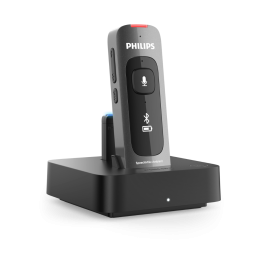
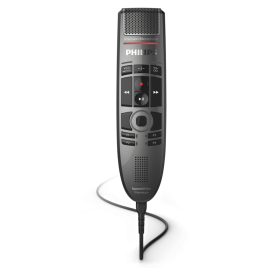
VoiceX can recommend suitable Philips, OM System or other professional dictation microphones depending on how and where the clinician wants to dictate.

Popular options to consider

  • Handheld USB dictation microphones for desktop use
  • Wireless dictation microphones for more freedom at the desk
  • Headset microphones for longer dictation sessions
  • Professional foot controls and accessories where transcription review is required

Ask VoiceX for a microphone recommendation before purchase if you are unsure what will suit your rooms, users or applications.

Best fit Lexacom Echo is a good match when...
New speech recognition users The clinician wants a simple and supported way to start dictating instead of typing.
Budget-conscious practices The practice wants a medical speech recognition subscription without moving straight to a more complex premium setup.
Lighter dictation users The clinician needs accurate medical vocabulary for everyday notes, letters, updates and edits.
AI scribe users The clinician still needs speech-to-text for edits, correspondence, messages and short notes outside the AI scribe process.

Not sure if Echo is the right fit?

VoiceX can help you compare Lexacom Echo with other medical speech recognition and AI documentation options, including Dragon Medical One and Lexacom Complete.

Lexacom Echo features

Lexacom Echo is designed for healthcare users who want practical, supported medical speech recognition that is easier to adopt.

  • Medical speech recognition: Designed for healthcare documentation and medical terminology.
  • 12-month subscription: Annual subscription invoiced upfront.
  • Windows only: For compatible Windows environments.
  • Live medical speech-to-text: Dictate into compatible Windows applications.
  • Medical vocabulary support: Suitable for clinical notes, correspondence, forms, messages and edits.
  • Comprehension Engine access: Recognises spoken or written medical phrases and can help convert them into abbreviations or detailed descriptions.
  • Useful for AI scribe users: Supports dictation of edits, letters, patient messages and short notes outside the AI scribe process.
  • Australian hosting for VoiceX clients: Hosted in Australia for VoiceX-supported deployments.
  • VoiceX onboarding included: Setup guidance to help users get started properly.
  • Unlimited VoiceX technical support: Included for the active subscription term.
  • Lexacom Complete pathway: Can form part of a broader Lexacom documentation solution including digital dictation, transcription and AI scribe options.

PC requirements

Lexacom Echo is compatible with Windows only. It is not supplied as a macOS speech recognition product.

  • Operating system: Windows only. A compatible and supported Windows environment is required.
  • Mac compatibility: Not compatible with macOS.
  • Internet connection: A stable internet connection is required for cloud-based subscription access and speech recognition services.
  • Microphone: A suitable professional dictation microphone or headset is recommended for best results.  See Microphones Recommended for Speech Recognition
  • Applications: Intended for dictation into compatible Windows applications. VoiceX can help confirm suitability for your intended use.
  • User setup: Each user should have their own configured access and onboarding support.
  • Practice environments: For shared, managed, remote desktop or locked-down medical practice environments, please check with VoiceX before purchase.

If you are unsure whether your computer or practice environment is suitable, contact VoiceX before ordering and we can help confirm the best path forward.

  • How is my order shipped and how long is delivery?

Write Your Own Review
You're reviewing:Lexacom Echo <br>Medical Speech Recognition |12-Months
Your Rating