
Call Us: 1300 551 778
Philips SpeechExec Pro is professional Windows dictation and transcription software for teams that want to keep a traditional author-to-typist process while adding direct desktop dictation, professional recorder support, work management and optional Dragon Professional v16 speech recognition.
Separate SpeechExec Pro Dictate and SpeechExec Pro Transcribe modules give authors and typists the tools they need without moving the workflow into a cloud-only environment.
SpeechExec Pro is Philips professional desktop software for managing digital dictation between authors and transcriptionists. It is designed for Windows-based teams that want a structured dictation and transcription process with professional recording hardware, worklists, routing and document status management.
Authors can dictate directly into SpeechExec using a Philips SpeechMike, record away from their computer with a PocketMemo DPM recorder, or use compatible Philips hardware for hands-free dictation.
Dictations can then be transferred to the appropriate typist through local network folders, email, or FTP. SpeechExec worklists help both sides see what is waiting, what is urgent and what has been completed.
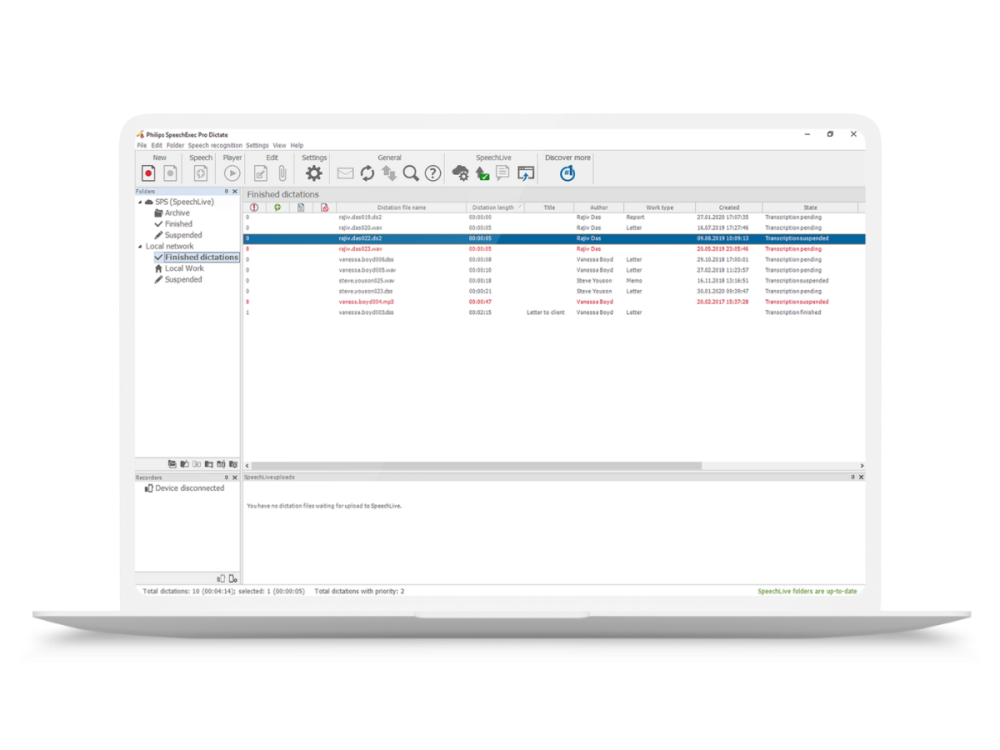
The author module provides the tools to create, manage and send professional dictations.
The transcription module gives typists and assistants a dedicated worklist and professional audio player for processing dictations.

One of the key differences between SpeechExec Pro and SpeechExec Basic is the range of ways an author can create a dictation.
Authors can record away from their computer using a Philips DPM professional voice recorder. When the recorder is connected, SpeechExec can automatically download the completed files and route them into the workflow.
Shop professional voice recorders →Authors who work at their computer can dictate directly into the SpeechExec recorder using a Philips SpeechMike, with record, stop, playback and navigation controls available from the microphone.
Shop Philips SpeechMike microphones →Philips ACC foot controls can be used with SpeechExec Pro Dictate for hands-free dictation and SpeechExec Pro Transcribe for hands-free transcription. Philips foot controls connect to the PC via USB and feature customisable layouts, allowing users to control the SpeechExec recorder features and transcribing functions.
Shop Philips ACC foot controls →SpeechExec Pro can integrate with Dragon Professional v16 to add speech recognition to the dictation process.
An author can dictate directly using a Philips microphone, or record first with a PocketMemo and have the completed recording submitted to the author's Dragon profile for background speech-to-text conversion.
The resulting text and original dictation remain available for review, allowing the assistant or transcriptionist to listen to the audio, correct recognition errors, apply formatting and complete the final document.
Human-in-the-Loop: Dragon creates the first text draft, but the typist remains responsible for checking the recognised text against the author's original recording before the document is finalised.
Learn about Dragon Professional v16 →
Record with a DPM, SpeechMike or compatible hands-free recording setup.
Send the dictation to the appropriate typist using your configured SpeechExec delivery method.
Type manually from the recording or review text created through optional Dragon speech recognition.
Finalise the document and update the dictation status so the author and typist can see the work is complete.
SpeechExec Basic, Pro and Enterprise all support professional dictation, but they are designed for different levels of recording flexibility, workflow management and administration.
Best when you want professional Windows dictation with portable recorder and direct SpeechMike capture, stronger workflow tools and the option to integrate Dragon Professional v16.
Shop SpeechExec Pro →
Best when authors primarily use Philips PocketMemo recorders and you need a simpler local recorder-to-typist workflow without Dragon integration or direct SpeechMike recording.
Explore SpeechExec Basic →
Best for larger organisations that need central administration, server-managed users and licences, virtual desktop support or greater control across departments, locations and larger user groups.
Explore SpeechExec Enterprise →
SpeechExec Pro remains a strong choice where an organisation wants installed Windows software and a familiar local author-to-typist workflow. But if there is no requirement to stay with an on-premises desktop platform, Philips SpeechLive is the recommended alternative.
SpeechLive moves the dictation and transcription workflow into the cloud, allowing authors and typists to work across browser, mobile and supported desktop environments without relying on locally installed SpeechExec software or traditional network-folder routing.
It also provides a clearer pathway beyond traditional dictation into AI Speech Recognition and AI Assistant document creation. For organisations, legal firms, and medical clinics reviewing how they want to create documents, that broader cloud and AI capability can make SpeechLive the more flexible, easier-to-maintain, and easier-to-manage long-term platform.
Authors use SpeechExec Pro Dictate. Typists and assistants use SpeechExec Pro Transcribe. VoiceX offers current Version 12 licences in one-year and two-year terms. Optional installation and support is also available.
For authors creating and managing professional dictations.
For typists and assistants receiving, transcribing and completing dictations.
SpeechExec Pro Dictate is the author module used to create, download, manage and send dictations. SpeechExec Pro Transcribe is the typist module used to receive work, control audio playback with a foot control and complete the transcription process.
Yes. SpeechExec Pro supports integration with Dragon Professional v16. Dragon licensing and the appropriate SpeechExec configuration are required. VoiceX can confirm the correct setup for direct or background speech recognition.
Yes. SpeechExec Pro Dictate includes direct recording capability and works with supported Philips dictation microphones such as the SpeechMike range.
Yes. A compatible PocketMemo recorder can be connected to the typist's workstation, and the typist can download the recordings into SpeechExec on the author's behalf. This is useful where authors simply return their recorder to support staff after dictating.
SpeechExec Pro Transcribe supports Philips ACC-series USB foot controls, including the ACC2310, ACC2320 and ACC2330 models.
SpeechExec Pro is Windows desktop software. Organisations requiring Mac support or a browser-based cloud workflow should consider Philips SpeechLive.
SpeechExec Pro is generally suited to smaller professional teams using locally installed Windows software. SpeechExec Enterprise is designed for larger organisations that need central administration, server-based management, virtual desktop support or greater control across multiple users and locations.
VoiceX can help match SpeechExec Pro Dictate and Transcribe licences with your Philips recorders, SpeechMike microphones, ACC foot controls and Dragon Professional v16 requirements — or tell you when SpeechExec Basic, Enterprise or SpeechLive is the better fit.