
Call Us: 1300 551 778
Philips SpeechExec Basic is installed Windows dictation and transcription software for teams that use Philips PocketMemo recorders and want a straightforward author-to-typist workflow.
Separate SpeechExec Basic Dictate and SpeechExec Basic Transcribe modules manage recorder downloads, worklists, job routing and professional transcription without the additional recording and speech recognition features of SpeechExec Pro.
SpeechExec Basic is Philips' straightforward desktop dictation and transcription software for Windows. It connects authors using Philips PocketMemo professional voice recorders with typists or assistants responsible for preparing their documents.
Authors dock or connect their recorder and SpeechExec can automatically download completed dictations, add them to the worklist and route the files to the appropriate destination using your configured local network, email, FTP or supported SpeechLive connection.
Typists receive and prioritise work through SpeechExec Basic Transcribe, control audio playback with a Philips ACC foot control and complete the document while both sides retain visibility of job status.

The author module is designed around professional Philips PocketMemo recorder dictation.
The transcription module gives typists a professional player and worklist for processing recorder-based dictations.
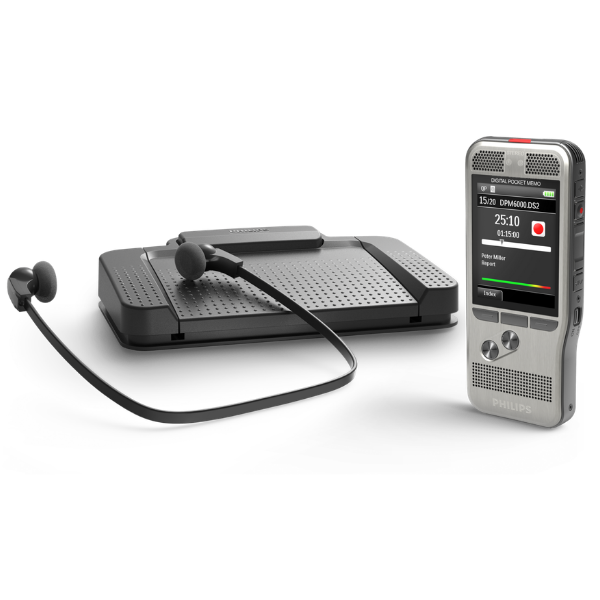
SpeechExec Basic is a good fit when authors prefer to dictate on a dedicated portable recorder and then return to the office to download their recordings for transcription.
Record away from the computer using a compatible Philips PocketMemo. Connect the recorder to a Windows workstation and SpeechExec Basic can automatically download completed files and route them into the dictation workflow.
Shop Philips professional voice recorders →SpeechExec Basic Transcribe supports the Philips ACC2300-series USB foot controls, giving typists hands-free control of playback while preparing documents.
Shop Philips ACC foot controls →Create the dictation using a compatible Philips PocketMemo professional recorder.
Connect the recorder and automatically download and send the audio to its configured destination.
The typist receives the recording and controls playback with a compatible Philips ACC foot control.
Prepare the final document and update the job status so the author can see the work is complete.
SpeechExec Basic is designed primarily for authors recording on Philips PocketMemo devices. If your authors also want to dictate directly into SpeechExec with a Philips SpeechMike, Pro is the better fit.
SpeechExec Pro also adds more workflow functionality and supports integration with Dragon Professional v16, allowing recorded dictations to be converted into text for Human-in-the-Loop review by a typist or assistant.
Explore SpeechExec ProSpeechExec Basic, Pro and Enterprise all support professional dictation, but they are designed for different levels of recording flexibility, workflow management and administration.
Best for a straightforward Windows recorder-to-typist workflow where authors primarily use Philips PocketMemo recorders.
Best when you want portable recorder and direct SpeechMike dictation, additional workflow features and optional Dragon Professional v16 integration.
Explore SpeechExec Pro →
Best for larger organisations requiring central administration, server-managed deployment and greater control across users, departments and locations.
Explore SpeechExec Enterprise →
SpeechExec Basic is a practical option when you want a simple installed Windows workflow built around Philips PocketMemo recorders. But if you don't need to stay with desktop software, Philips SpeechLive is the recommended alternative.
SpeechLive moves professional dictation and transcription into the cloud, giving authors and typists more flexibility across browser, mobile and supported desktop environments without relying on traditional local workflow routing.
It also provides significantly more room to grow, with options for AI Speech Recognition, AI transcription and AI Assistant document creation. For organisations reviewing how they want to create documents over the next several years, SpeechLive is the broader and more flexible Philips platform.
Authors use SpeechExec Basic Dictate. Typists and assistants use SpeechExec Basic Transcribe. VoiceX offers current Version 12 licences in one-year and two-year options.
For authors downloading, managing and sending dictations from compatible Philips PocketMemo recorders.
For typists and assistants receiving, playing and completing professional dictations.
SpeechExec Basic Dictate is the author module used to download, manage and send recordings from compatible Philips PocketMemo recorders. SpeechExec Basic Transcribe is the typist module used to receive work and control audio playback while preparing documents.
SpeechExec Basic is primarily designed around portable PocketMemo recorder dictation. SpeechExec Pro adds direct desktop dictation with supported Philips microphones, additional workflow features and support for integrated Dragon Professional v16 speech recognition.
SpeechExec Basic Dictate is designed for Philips PocketMemo recorder workflow. If you want to record directly into the SpeechExec software using a supported Philips SpeechMike, choose SpeechExec Pro instead.
SpeechExec Basic does not provide the integrated Dragon speech recognition option available with SpeechExec Pro. If background speech recognition is required, SpeechExec Pro is the appropriate desktop SpeechExec edition to consider.
Philips currently specifies the ACC2300-series USB foot controls for SpeechExec Basic Transcribe, including the ACC2310, ACC2320 and ACC2330 models.
SpeechExec Basic is Windows desktop software. Organisations needing Mac support, browser access or a cloud-based workflow should consider Philips SpeechLive.
Yes. Philips provides an optional SpeechLive connection that can extend a SpeechExec workflow, including allowing mobile dictations to be sent into SpeechExec. Organisations looking for a broader cloud-based platform should also consider using SpeechLive as the primary workflow instead.
VoiceX can help match SpeechExec Basic Dictate and Transcribe licences with your Philips PocketMemo recorders and ACC foot controls — or tell you when the additional flexibility of SpeechExec Pro, Enterprise or SpeechLive makes more sense.