Call Us: 1300 551 778
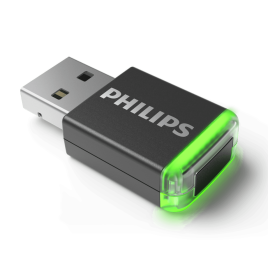
The Philips ACC4000 provides charging, pairing and the wireless computer connection for a compatible SMP4000 or SMP4010 microphone.
Set up another desk for wireless dictation or replace an existing dock. The ACC4000 connects a compatible SpeechMike Premium Air to your computer, pairs when the microphone is docked and recharges the microphone battery between sessions.
This dock supports the SMP4000 push-button and SMP4010 slide-switch microphones. The microphone is sold separately. Check your exact model before ordering a replacement dock.
Philips specifies charging the microphone battery in under three hours with the dock. Charging from a computer USB port can take longer. The dock does not contain the microphone battery.
The handheld microphone micro-USB port is for charging only; it does not turn the microphone into a wired audio device. Recording uses a wireless receiver connection. For a portable receiver without a dock, compare the ACC4100 AirBridge, which does not charge the microphone.
See our speech recognition solutions for compatible workflow options. Software licences, microphone and foot control are not included with this dock.
Contact VoiceX with your microphone model and software before ordering. We can help check the dock, controls and computer requirements together.
For Philips SpeechMike Premium Air SMP4000 and SMP4010. Requires a compatible computer, USB connection and recording or speech recognition application. Controls and optional foot-control functions depend on the application, drivers and configuration.
VoiceX supports Windows 11. VoiceX does not support Windows 10, which has reached the end of standard Microsoft support. Confirm your exact application and operating system before deployment; Mac functionality may be limited.
Keep commonly used microphone, dock and receiver firmware compatible. See the Philips ACC4000 specifications and SpeechMike Premium Air operating instructions.