
Call Us: 1300 551 778

Share recordings, route work to typists and track transcription progress in one cloud workspace. Use compatible Windows and Mac computers, supported recording hardware and the ODMS Cloud mobile app for authors.
New accounts require a minimum of two users: one author and one typist.
ODMS Cloud connects authors and transcriptionists through a shared dictation workspace. Authors upload recordings, assigned typists work on their transcription tasks, and teams track file status from compatible computers. The mobile app lets authors record and upload dictations while away from their desk.
Authors upload dictation files to the Cloud, enabling transcriptionists to work from any location, at any time.
A system designed for the features you need, in an interface that is easy and simple to use.
HTTPS protects data in transit, with two-factor authentication for account sign-in.
Hosted on Microsoft Azure, with regional cloud storage and central administration.
Browse the ODMS Cloud range for compatible workflow products and kits.
Thanks to our advanced dictation management system hosted on the cloud, dictations are swiftly distributed to all authorized users across PC, Mac, or our smartphone app. Cloud features are delivered through the web service. Keep the desktop and mobile apps updated for current device support and functionality.
ODMS Cloud system facilitates seamless sharing of dictation files between authors and transcriptionists from any location and at any time. With files stored securely in the cloud, the need for a dedicated server is eliminated, making setup quick and hassle-free.
ODMS Cloud uses HTTPS for encrypted data transfer and supports two-factor authentication for sign-in. Supported recorders and the smartphone app can upload recordings protected with AES-256 encryption. User permissions control access to recordings and workflow information.
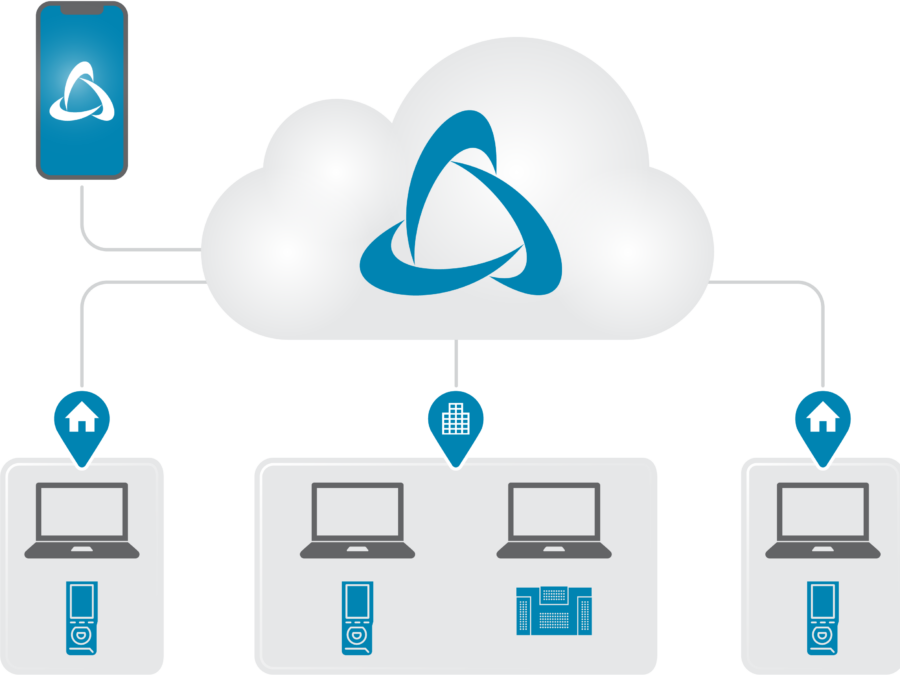
Use ODMS Cloud from compatible Windows and Mac computers, with the smartphone app for authors. Internet access and the appropriate apps and account permissions support recording, upload and transcription workflows.
ODMS Cloud ensures that your new audio files are instantly available across all your devices, keeping you in perfect sync. Uploaded dictations and transcription status are shared with the users assigned to the workflow.

ODMS Cloud is built and hosted with the Microsoft Azure cloud computing platform. Your data will be stored within your region (USA, Europe or Australia). Not only is security paramount but this means that there is no need to purchase or maintain additional local storage for your business environment. For added peace of mind, you have the option to download and back up all your audio files to local storage at any time, at the push of a button.
The cloud service provides current web features without maintaining a local dictation server. Keep the desktop and smartphone apps updated to receive current device compatibility and app improvements.
ODMS Cloud prioritizes simplicity. It offers an intuitive browser interface and user-friendly apps for audio file creation, upload, and transcription. It streamlines vital information for authors and transcriptionists, providing efficient organization and management tools.
ODMS Cloud apps: Web, Desktop, Smartphone, and Device Customization.
Web app: browser access for recordings and progress tracking.
Desktop app: Windows PC/MAC, for uploading, dictation, transcription.
Smartphone app: recording, editing, direct cloud upload.
Device Customization: USB-connected, template-based settings management, import/export support.
We have meticulously crafted ODMS Cloud to provide a refined and straightforward interface. By decluttering unnecessary information, we ensure a user-friendly experience tailored to your needs. This simplicity not only enhances ease of use but also boosts productivity and reduces mental strain, allowing you to focus on your tasks with clarity and efficiency.
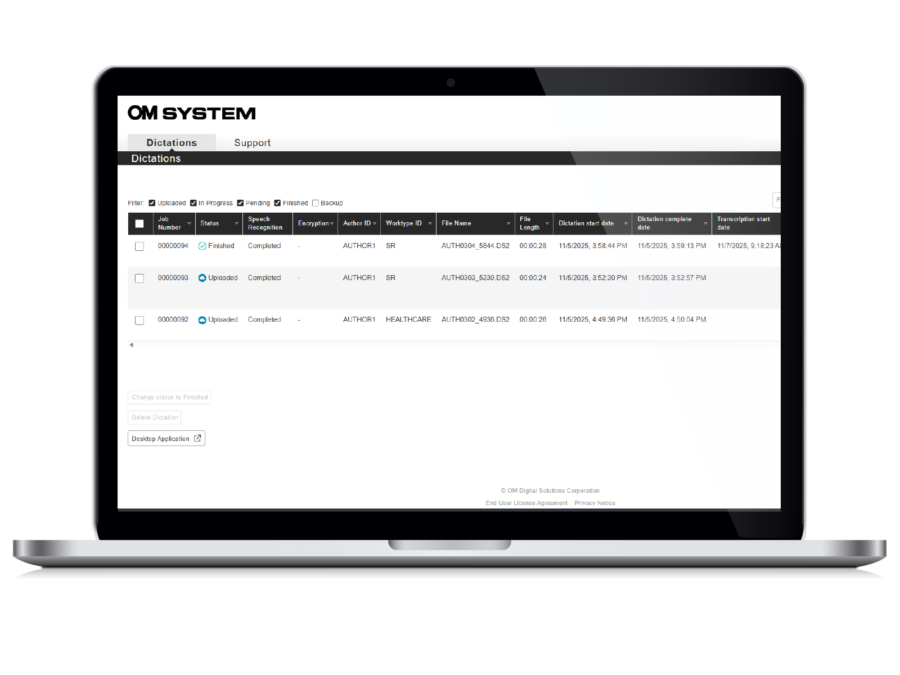
Authors and typists require access solely to essential information, ensuring simplicity. Administrators’ privilege settings guarantee personal dictations and completion progress visibility. Authors view only their recorded dictation files and their statuses, while transcriptionists access files recorded by the assigned author. If multiple transcriptionists are assigned to one author, all assigned transcriptionists can view the files. This streamlined approach enhances productivity by eliminating unnecessary distractions.
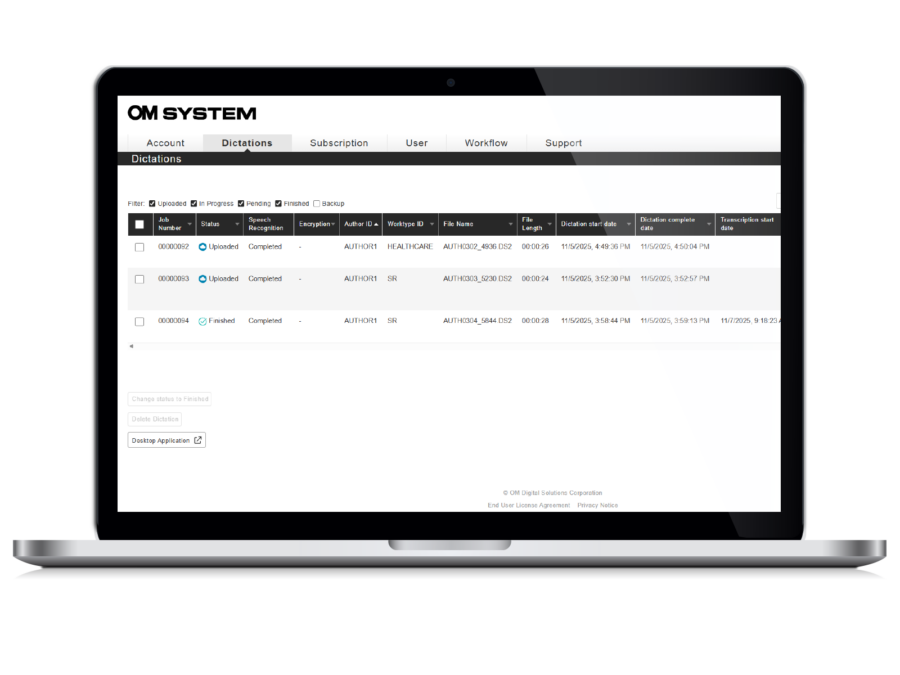
Managing a large volume of audio files becomes efficient with prioritization options. Filter files by status (uploaded, in progress, pending, or finished) or organize them by various criteria such as job number, author, work type, length, or dictation & transcription start and end dates. This streamlines workflow and enhances productivity.
In ODMS Cloud, authors and transcriptionists benefit from comprehensive playback features. They can play, rewind, and fast forward audio files at their convenience, with speed control options ranging from 50% to 200%. Noise cancellation functionality ensures optimal audio clarity. Volume control allows for fine-tuning audio levels, while the ability to add or remove index marks offers organizational flexibility. Status updates inform users of file progress, whether pending or finished. Furthermore, priority settings enable efficient task management by allowing users to designate tasks as normal or high priority, ensuring timely completion of urgent assignments.
In ODMS Cloud, administrators have the flexibility to adjust multiple configurations on the web application, including user management, license management, inventory overview, issuing license requests, and workflow design, all accessible through the ODMS Cloud web interface. Additionally, crucial details such as license usage status and expiration dates are conveniently presented in a comprehensive list format, streamlining administrative tasks and enhancing efficiency.
Transcription Group Configuration: Streamline rule-setting for groups. Especially useful for multiple Authors. Worktype ID/Option Item Setup: Classify Dictation files for better organization. Define Worktype IDs and add detail with option items on supported recording devices and the smartphone app.
Enhance efficiency with ODMS Cloud. Tasks are assigned based on Author or a combination with Worktype. Register default templates based on Author and Worktypes, auto-opening for transcription. Simplify by transferring Worktype ID to Recorders via USB. Assign a transcription group to each Author.
ODMS Cloud provides extensive playback support for a variety of file formats including DS2, DSS, WAV, and MP3, ensuring compatibility with diverse recording preferences. Whether encrypted or unencrypted, users can seamlessly access and review their audio files with ease, enhancing flexibility and convenience in dictation management.
ODMS Cloud supports Microsoft Edge, Google Chrome and Safari. See PC Requirements for desktop app and device compatibility.
Authors
• OM SYSTEM – DS-9600, DS-9100, DS-2700
• Olympus – DS-9500*, DS-9000, DS-2600
Transcription
• OM SYSTEM foot pedals- RS-31N, RS-28N, RS-27N
• Olympus foot pedals – RS-31H, RS-28H, RS-27H
Set supported H/N foot controls to OM mode. Use the current desktop app for DS-9600 compatibility.
* The DS-9500 can email recordings over Wi-Fi to a transcriptionist’s ODMS Cloud Desktop App, which receives and uploads the files. Configure this email workflow before relying on wireless delivery.
VoiceX does not support Windows 10. Check your intended device, operating system and managed-computer setup before deployment.
